My Claims
The My Claims panel is a workflow management addition to the Home page that provides one-click access to claims that require your attention. If your site uses this feature, these claims are the top priority in your daily workflow. Click on a line item to jump directly to the related claims.
| Inbox category | Description |
|---|---|
| Claims assigned to me (unrel) | Displays the count and value of any unsent claims with a specific error automatically assigned to you or your department by the Error Rules. |
| Claims assigned to me (rel) | Displays the count and value of any sent claims automatically assigned to you or your department based on specific payer status information by the legacy Payer Status Rules or new Payer Status Rules. |
| Claims assigned by a user | Displays the count and value of any claims manually assigned to you by another user. |
| [filter name] | The My Claims panel also includes the count and value of claims for assigned or selected Home Page Filters such as the Unreleased Unreleased reflects an accepted or warned claim that has not been sent to the clearinghouse. (Rejected claims cannot be released.) Medicare Claims or UNR_ALL filters in the examples. |
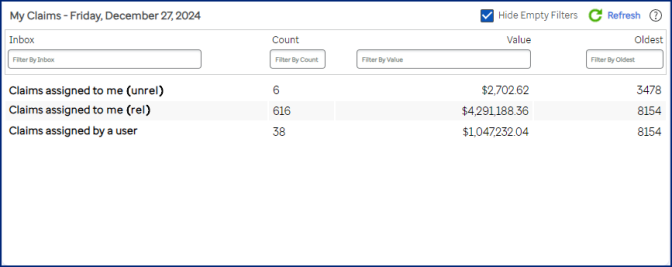
Biller and supervisor home page views
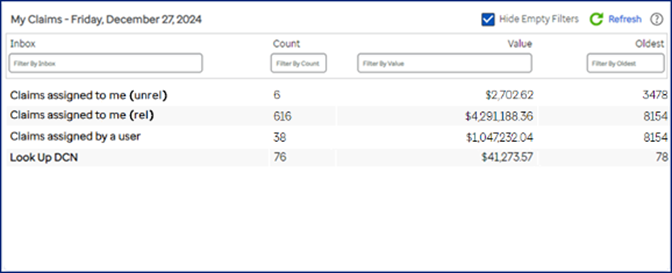
To help you evaluate what to work on first, each category shows claim count, amount, and the age of the oldest claim in the group. Within the Biller or Supervisor home pages, you can use filtering field options to target your view. For example, type "blue" in the Filter by Inbox field to show only entries with the word "blue" in the category name.
- The system updates claim count and amount information every five minutes. Click the Refresh link or Refresh List button in the panel to see if there have been updates within the last five minutes.
- Default order when displaying claims from the claim assignment lists is patient last name, first name. You can change the display order to use different criteria in the User Preferences page.
- By default, the system selects the Hide Empty Filters checkbox to hide filter names or assignment categories that have zero claims. Clear this checkbox to see all possible filter names and assignment categories.
- Age of a claim is determined from the Claim Date field. On a UB, this date is immediately below the service lines section. On a 1500, this date is in Box 31.
- Established system claim assignments are cached and refreshed every 10 minutes. After using Manage Claim Assignments to add, change, or delete assignments, wait 10 minutes for the assignments to take effect. If an update is made to a filter itself (by you or your manager), these items are updated as soon as they are saved.
- If your site uses Restrict User Access (RUA), only claims in your RUA user access profile are included in the filter counts. Claims assigned to you automatically based on rules or manually by other users can be claims that are outside of your RUA profile.