Provider Communication Gateway (PCG)
Provider Communication Gateway (PCG) is a contracted add-on feature in Assurance that extends current edit functionality.
To improve visibility to payer requirements earlier in the claim life cycle, Assurance has integrated with PCG to provide an additional payer-sponsored edit package. This earlier visibility to return and rejection edits is designed to reduce rejections and denials that lead to costly administrative rework.
- PCG edits can be configured to be applied at the time of bridge or to be run manually in Claim Form Interface (CFI
 Claim Form Interface (CFI) is the claim display in Assurance. CFI represents the selected claim so that users can review, change, validate, or delete it. CFI contains multiple tabs (pages).).
- All PCG edits can be overridden.
- Any of the edit names (e.g., OI, PI, PCG, EES) can be used for filtering in the Edit Error field of the View/Modify Claims page.
- PCG edits can be used with workflow codes so the edits are returned in the Assurance CRD report to allow routing to the appropriate team for review.
| Items | Fundamental facts |
|---|---|
| Availability | Available to users working for organizations that have contracted for the PCG add-on feature. |
| Location |
VALIDATION METHOD field in CFI For professional claims:  For institutional claims: 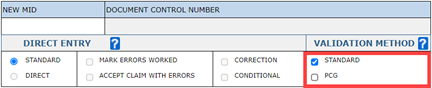 |
Validation, error types, status codes, workflow codes
The following validation, error type, status code, and workflow code information will only apply to customers that have the PCG feature enabled.
Validation
For both institutional and professional claims, the VALIDATION METHOD field in CFI can be set to validate a claim in one of three ways:
- with standard edits only (default): only the STANDARD checkbox selected
- PCG edits only: only the PCG checkbox selected
- both standard edits and PCG edits: both checkboxes selected
- The PCG checkbox is active when PCG is enabled.
- PCG-enabled payers are defined based on the values in the Payer ID field (TP_ID).
Error type
Several new edits can appear on the claim when the PCG edits occur:
- OI indicates that the error is on an institutional claim (e.g., OI-0005233).
- OP indicates that the error is on a professional claim (e.g., OP-0000285).
- Edit names that begin with PCG (e.g., PCG_ERR400) indicate that the claim couldn’t be validated by PCG.
- The user can override the edit or deselect the PCG checkbox, and then validate the claim again.
- Edit names that begin with EES (e.g., EES_010101) indicate a system communication issue with PCG services.
- The user can try to validate the claim again at a later time.
- The user can override the edit or deselect the PCG checkbox, and then validate the claim again.
OI and OP errors are claim related errors; whereas PCG and EES errors are system related.
Status codes
The following status codes have been added for PCG:
| Code | Description |
|---|---|
| 744 | Standard and PCG validation performed |
| 745 | PCG validation performed |
| 746 | PCG Errors overridden |
| 747 | PCG could not validate the claim |
| 748 | PCG services could not be reached - try again |
Workflow codes
PCG errors can be assigned to a unique workflow code group for routing errors to the correct user or team of users for resolution. (Refer to HIS Workflow Assignment for more information on using workflow codes.)
Reporting
The PCG errors will appear in all existing edit reports.