MDE check eligibility
See also: Direct Entry Overview, Direct Entry Workflow, and Sending Adjustments
Direct Entry (DE) Check Eligibility will return eligibility errors from Medicare (e.g., typos in HICs or names, coverage conflicts, timeliness of some services). These errors are not detectable by payer-requirement edits. If not corrected, the eligibility errors will cause Medicare to reject the claim.
Workflow
The best time to check the eligibility of direct entry claims is immediately after the claims are submitted and stored. Use the eligibility profile to automate eligibility checks during claim bridging.
When check eligibility returns an eligibility error, the error is added to the claim. When you open the claim, the system displays eligibility errors that can be fixed just like any other error.
After all direct entry errors have been fixed, check Mark Direct Errors Worked. This indicates to another user that the direct entry errors are fixed and just waiting to be rechecked. Fix the payer-requirement errors, and validate as you go. To check the fixes to the eligibility errors, run check eligibility again after corrections are made. You can submit a batch request to check eligibility on multiple claims, or you can submit a single eligibility request while viewing a claim.
What check eligibility does
For Medicare Part A Direct Entry claims, the system submits ANSI 270 claim status request transactions to Medicare. The system receives and processes the ANSI 271 claim status responses from Medicare, adds eligibility errors to the claims, and posts the 271 transaction within the Payer Activity tab. You can view the errors or the 271 transaction while viewing your claims.
In addition, check eligibility uses a set of status history codes to attach a permanent record to the claim:
| Code | Description |
|---|---|
| 400 | Eligibility: Not released, claim is waiting for response |
| 401 | Eligibility: Request failed, could not connect to eligibility service |
| 402 | Eligibility: Request issued |
| 405 | Eligibility: Response received, patient is covered |
| 406 | Eligibility: Response received, patient is not covered |
| 407 | Eligibility: Request manually canceled |
| 408 | Eligibility: Errors overridden |
| 409 | Eligibility: Request abandoned |
| 410 | Eligibility: Other benefit information received |
| 743 | Medicare Eligibility Edits Eligibility Edits is a separate contractual add-on that allows a site to submit and receive 270/271 eligibility transactions regarding patient coverage. Medicare Direct Entry (MDE) users also have access to this add on for MDE claims. suppressed |
Medicare eligibility edits suppression
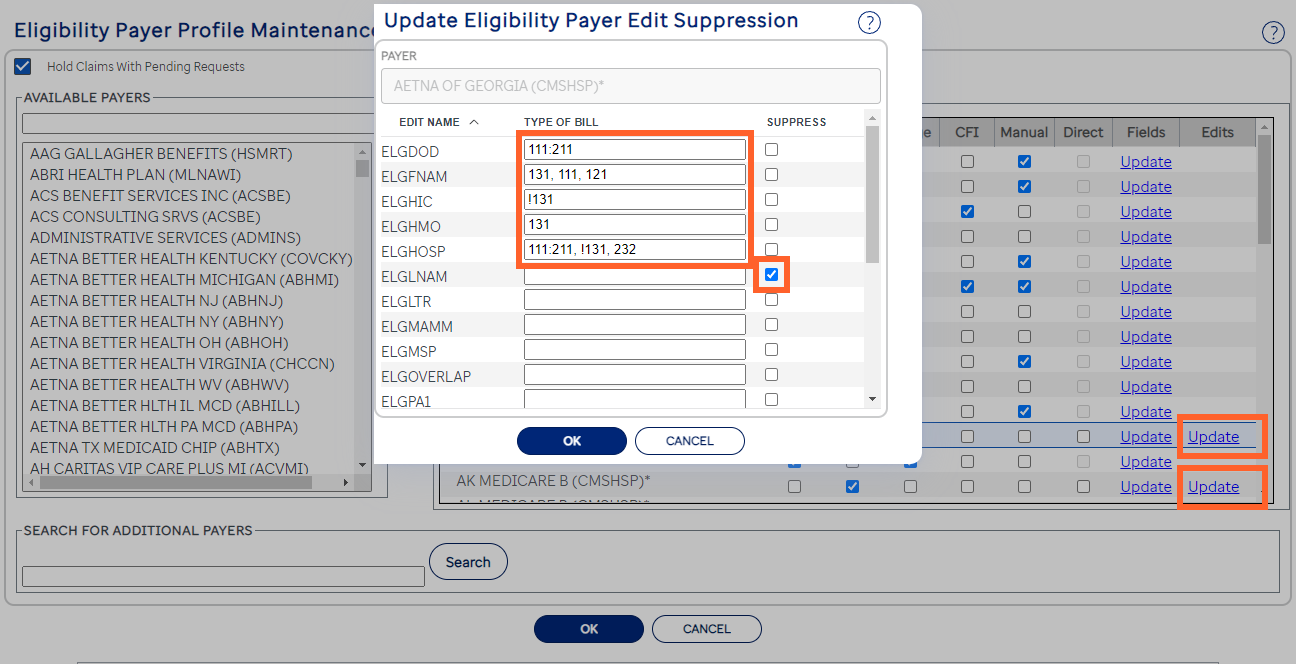
Assurance customers that have contracted for MDE as an add-on feature are able to suppress specific eligibility edits by edit name in the Eligibility Payer Profile Maintenance page.
Eligibility edits can be suppressed as an entire edit or based on the claim’s type of bill (TOB).
Entire Edit: Suppress an entire edit by checking the Suppress checkbox for the specific edit.
Based on the claim's TOB: To set the values for the specific TOBs, you may use a variety of numbering conventions. Those conventions and some sample values are described in the list below.
- Range (separated with a colon (:)): Type 111:211 to include TOBs beginning with 111 and ending with 211. (ELGDOD in screenshot).
- Comma-separated list: Type 131, 111, 121 to find these three TOBs (ELGFNAM in screenshot)
- Not in list (begins with an exclamation point (!)): Type !131 to skip 131 as a TOB (ELGHIC in screenshot).
- In list: Type 131 by itself to include 131 as a TOB (ELGHMO in screenshot).
- Combination: Type any combination to use different numbering conventions in the same field (ELGHOSP in screenshot). Note that the distinct numbering conventions are separated by a comma (,).
Suppressed eligibility edits will not be shown in the CFI Claim Form Interface (CFI) is the claim display in Assurance. CFI represents the selected claim so that users can review, change, validate, or delete it. CFI contains multiple tabs (pages).. When any configuration eligibility edit is suppressed during the eligibility check, Assurance will add a status history code to indicate that eligibility edits are being suppressed.