Print claim options
Menu location: Claims menu, Print Claims
Toolbar button: Print 
If your system is set up to allow the override of default settings for paper claims, then you will see the Print Claim Options page when you use the Claims menu and/or the Print button to print claims. Otherwise, the system skips this page and applies the default settings selected through print options and paper commands.
Paper form type
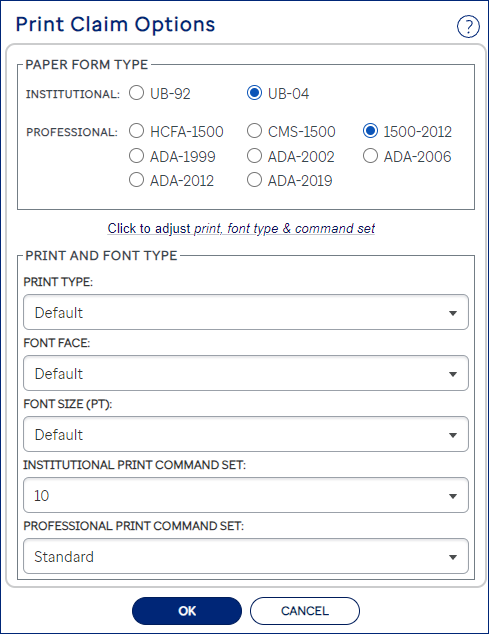
For batch jobs, use this section if you need to change the default institutional or professional claim form type.
Batch jobs: Adjusting print type, font, & command sets
Click the link to expand the page if you need to display the fields to change the print type, font face, font size, or paper command settings for the specific print job. You can change some, all, or none of these settings. Click the OK button when you have finished making any selections and are ready to create the paper claim file.
Single displayed claim: Adjusting print type, font, & command sets
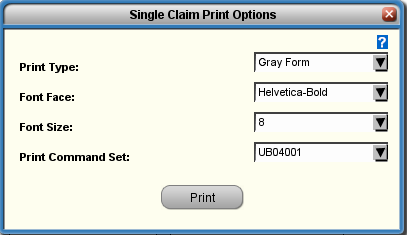
The system uses the default paper claim form type for a displayed claim. You can change print type, font face, font size, or paper command settings as needed. Click the Print button when you have finished making any selections and are ready to print the individual claim. Please note that if you are printing the Medi-Cal Payment Request for Long Term Care form 25-1 (edit master E023), then the system will always use the red form as the print type selection, regardless of any displayed option.
Print type notes
| Option | Description |
|---|---|
| Gray form | (Laser printer only) Creates file of PDF claims. Prints complete claim form (gray background and data) on plain paper. If you print Claim + EOB, the EOB must be Gray Form. All dental forms are gray form only. |
| Red form | (Laser Printer) Creates a print image file. Prints claim data on a pre-printed claim form. |
| Tractor form | Creates claim data file to print on pre-printed, tractor-feed claim forms. Does not use form feeds to separate claims. |
| Tractor form legacy | Creates claim data file to print on pre-printed, tractor-feed claim forms. Separates claims with form feeds. |
Command set notes
The Command Set drop-down list displays the set of paper commands the system will apply by default to the print job. The Standard option refers to the system's built-in set of paper commands for printing claims plus any special adjustments, if your site has added them. If your site has also set up additional sets of paper commands for a particular claim form, then you can choose from all available sets to override the default setting for this batch print job.
- For the best results, print the CMS 1500-2012 paper claim using Helvetica Bold or Sans Serif, size 8 or 9 for either font.
- Courier and Courier-Bold are fixed-width fonts. (This means that all the letters are the same width. The letter 'i' takes the same amount of space as the letter 'm'.)
- If you always override default options to print certain claims to a specific form with a specific set of print options, you can automate printing these paper claims. Set up an auto module and use the Print Options Override section to change the default settings.