Anticipated payment data on the displayed claim
Payer Activity tab, AP source
With the new Payment Clarity contractual add-on module, Assurance can automatically track and identify variance between the anticipated payment and the actual payment based on your defined threshold. You can see the anticipated and actual payment information in the Payer Activity tab:
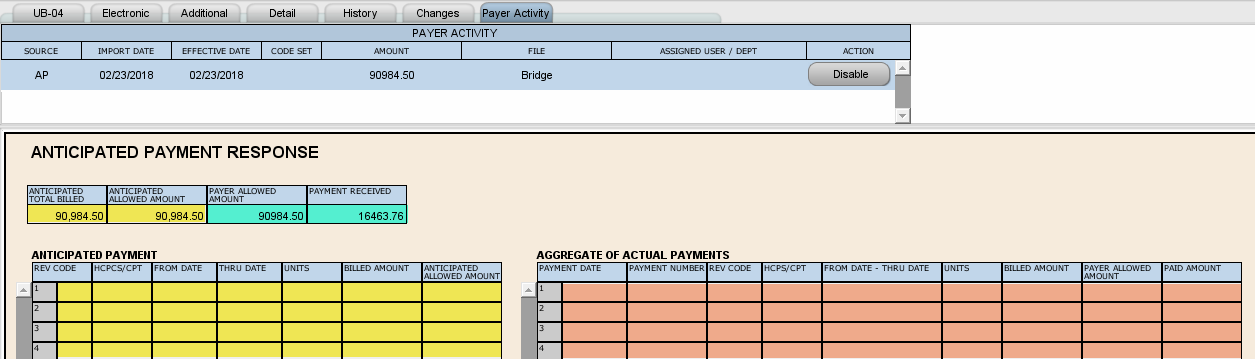
To review the Payment Clarity information, select the entry with AP listed as the source in the Payer Activity tab. This entry is only available when anticipated payment information is submitted with the claim data. The AP entry consists of four summary payment fields, an Anticipated Payment table, and an Aggregate of Actual Payments table. All fields are read-only. Use the screen shot in this topic to review the data sources for these fields:
| Background | Source | Field listing |
|---|---|---|
| Yellow | Data submitted with the claim | Summary fields Anticipated Total Billed and Anticipated Allowed Amount above the table data. One of these values is required during the submission (bridge) process to create the AP record on the claim. All fields in the Anticipated Payment table: Rev Code, HCPCS/CPT, From Date, Thru Date, Units, Billed Amount, and Anticipated Allowed Amount. |
| Green | Aggregated values from all posted remits | As remit payments are posted or matched to the released claim, the system calculates and adds summary payment information in the new Payer Allowed Amount and Payment Received fields above the table data. |
| Orange | Aggregated listing of remit details | All fields in the Aggregate of Actual Payments table: Payment Date, Payment Number, Rev Code, HCPCS/CPT, From Date - Thru Date, Units, Billed Amount, Payer Allowed Amount, and Paid Amount. This data is only added if the Anticipated Payment table is populated. |
The AP record displays information from the submission file, claim data, and remit data together in one place for reference. It does not include the comparison results. You can check the claim History tab for clearinghouse status code 5710 (within acceptable variance) 5711 (overpayment) or 5712 (underpayment). You can also run the Payment Comparison Variance report to review the comparison results.
Disable button
The AP entry on the Payer Activity tab has a Disable button. Click this button to remove an unreleased claim from the payment comparison process. You may want to disable the comparison process if the total charges or expected payment changes after the claim is bridged to avoid skewed results.
Find claims with AP data
There are two options available from the Select Field items in the claim filter to find claims with AP data: Status: AP Final and Status: AP Pending. Use Status: AP Final to locate claims with AP data that have a final status such as 5710 (within acceptable variance), 5711 (overpayment) and/or 5712 (underpayment). Use Status: AP Pending to find claims that have AP data that have not been finalized.