Print an unreleased paper claim
An unreleased claim can be printed from both print tools shown here.

- Quick Print: Use this button to print the open unreleased paper claim. The system adds a Not for Payment watermark on each unreleased printed claim. This watermark alerts users that the claim is internal only and is not suitable for sending to a payer. Released
 Released reflects an accepted claim sent to the clearinghouse for transmission to the payer, for printing, and/or for archive. claims do not contain the watermark.
- Print List - Use this button to open a menu of claim-based items. Select Print and Release w/o Watermark to print the open claim for release to its payer. When printed from this option, the unreleased claim is printed without a watermark, changed to a local-print claim, and released.
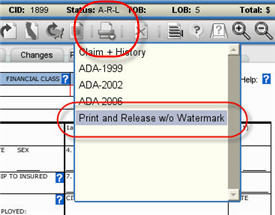
Follow these steps to print and release an unreleased claim without the watermark:
- Click the Print List button.
- Select the Print and Release w/o Watermark option.
- Click OK in the confirmation box to continue the task. The system changes the claim delivery type to a local print claim meaning you must mail the claim to the payer. The system then creates and opens the claim file in a separate window.
- Click Print and/or Save before closing the window.
The system queues the claim for the next release job. This locks the claim data so it cannot be changed. You can still see the claim until you navigate away from it. Once you navigate to another feature, you will not be able to see the claim until after it is released.
The system adds one of two local status codes to the claim History. You can use these codes to find the claims after they are released:
- 185 - Claim printed for release without errors
- 186 - Claim printed for release with errors
Notes
- Because Print and Release w/o Watermark can send claims with errors to payers, it is visible only to users who have the assigned function Allow Print Watermark Override. The option should be used only when the claim is ready for release.
- The Print and Release w/o Watermark option is not available for unreleased Direct Entry, Medicare Secondary Outsource, Hard Copy Direct, or already released claims.
- If you need to change a released claim after using this option, create a rebill.
- You can still print the claim after it completes the release process, if needed. Use the batch print job through the Claims menu, or open the released claim and use the Quick Print button.