Set up Direct Entry accounts
Menu location: Maintenance menu, System Administration, Direct Entry Accounts
Use this page to set up all accounts that will be used by the product to connect to the Medicare FISS. These accounts should be dedicated to the product's connection. Do not set up existing accounts that are used outside of this product.
If you send Medicare Part A (UB) Direct Entry claims to more than one FI, you will need two sets of dedicated accounts. The account names you assign should indicate the FI.
Whenever any change is made on this page, you must click Update and then OK to save the changed information. To make changes to Direct Entry Accounts, you must be a member of a group that has the following system functions assigned: DE: Create Accts, DE: Delete Accts, DE: Edit Accts, and DE: View Accts.
| Field name | Usage |
|---|---|
| Account Name | This name will display in the Accounts list on this page. Make it descriptive of the FI. |
| Function | 1) Check the Medicare activities this account
can perform: Check Eligibility, Check Edits, Send Claims, Check Status, and Shared. 2) Enable an account that the system disabled due to a password issue. |
| Fiscal Intermediary panel | The Name list contains all FIs to which this product can connect. Select your Medicare Part A FI. After you have selected an FI, the FI's Schedule of availability displays. Your Direct Entry processing must occur inside this schedule. |
| Authorization panel: Generate password every x days | When checked, this product will automatically change your passwords on the schedule you specify. If unchecked, you are responsible for manually changing the passwords. Passwords are changed directly - at each authorization point. The days value indicates the life of the password set. This number is used when passwords are changed automatically. Set it for five days less than the shortest password life. |
| Authorization panel: Password Last Changed on | Automatically updated when passwords are changed automatically. Clearing the date will force a password change during the next change sweep. |
| Authorization panel: User Name | The user name used to navigate through the named authorization point. |
| Authorization panel: Password | The encrypted password used to navigate through the named authorization point. |
| Provider Numbers | Select the provider numbers that can go to Medicare DDE through this account. Use the arrow button to move the entries to This Account. |
| Alias List | List of authorization points that must be navigated to connect to the Medicare DDE. This list is predetermined for each FI. |
Disabled accounts
When the system uses an account and encounters an invalid or expired password, it sends an asynchronous message to the Home page and disables the account by clearing the Enabled check box. The system then restarts the job and uses the next enabled account. Follow these steps to enable the account after you contact your Medicare Fiscal Intermediary to update the password:
- Select the account name from the Accounts list.
- Update the associated Password.
- Select the Enabled check box.
- Click Update.
- Click OK.
Sharing Medicare credentials across linked CIDs
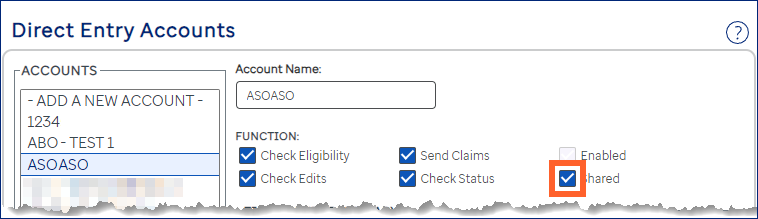
For facilities that have multiple CIDs, Assurance now provides the ability to share Medicare credentials across linked CIDs. A Shared checkbox has been added to the Direct Entry Accounts (Maintenance) page to configure sharing for the account.
- The Shared checkbox doesn’t appear if the facility doesn’t have linked CIDs.
Clicking the Shared checkbox shares the selected MDE account with the linked CIDs.
Reporting on your accounts
The Direct Entry Accounts report is available for you to view your accounts.
- When the system disables an account, the date displays for reference below the cleared Enabled check box.
- Claims are sent to payers in groups (sessions). Each session uses one account. If your site can run concurrent sessions and you request multiple accounts, set them up here so that multiple sessions can be sent to the FISS at the same time. The general recommendation is to request four accounts if you process fewer than 500 Direct Entry claims per day. If you process more than 500 Direct Entry claims per day, request one more account.