Home
There are three different Home page views. Your view is based on whether your user account has an assigned user role in user maintenance. This topic covers the default Home page view when no role is assigned. Other options include a biller view or a supervisor view.
The default view has five basic sections:
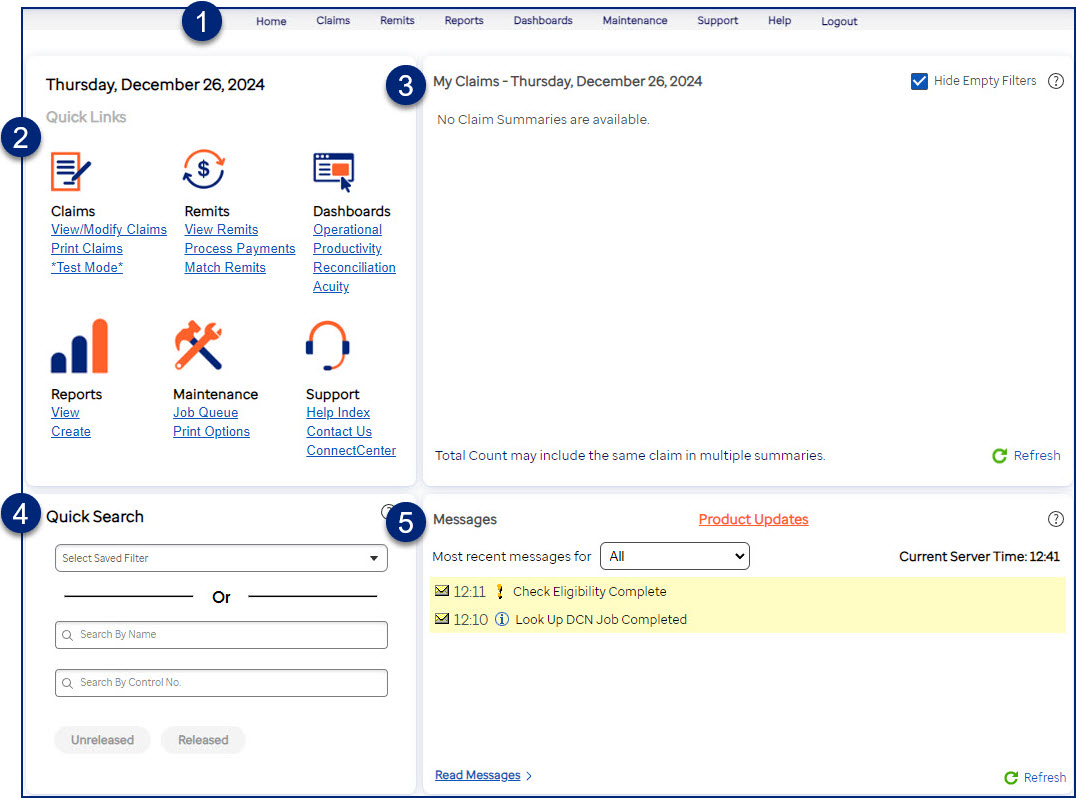
- Menu bar: Use it to navigate to a feature or task. Each option provides access to tasks you perform related to your claims, remits, reports, dashboards, and site maintenance. The available options are based on the system functions assigned to your group.
- The Quick Links section offers shortcuts to commonly used features or tasks. Links in black text are inactive, indicating that your group does not have the assigned system functions.
- My Claims provides one-click access to claims that require your attention, if your site uses any of the workflow features.
- Use Quick Search to find and open a set of claims without navigating to the claim filter.
- Messages inform you about the status of events like claim submission, expiring passwords, generated reports, and other events.