Payment Comparison Process
Menu location: Remits menu, Payment Comparison Process
Group right: Payment Comparison Process
You can manually trigger the system to run the comparison calculations using the Payment Comparison Process option in the Remits menu. This task is useful if you change the Payment Comparison Configuration settings. This task forces the system to reprocess the claims with the selected payment data.
Follow these steps to manually run the Payment Comparison Process:
- Select the Remit menu, Payment Comparison Process option.
- Use the Remit Filter to target the matched remit payments you want the system to review.
- Click Continue after you have selected the criteria or chosen listed payments. The system returns the user to the Home page.
The system reviews the claims related to the selected payments. It updates the AP status for any finalized claims adding clearinghouse status code 5710 (within acceptable variance), 5711 (overpayment), or 5712 (underpayment). The system also returns a message to the home page with a summary of processing results based on the claims:
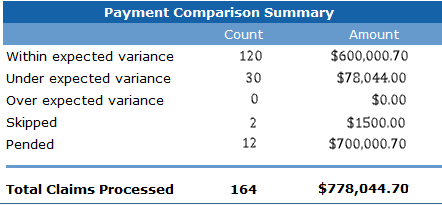
| Category | Definition |
|---|---|
| Within expected variance | The payment meets the set threshold for variance. Status code 5710 is added to the claim history record. |
| Under expected variance | The payment is below the set threshold for variance. Status code 5712 is added to the claim history record. |
| Over expected variance | The payment is above the set threshold for variance. Status code 5711 is added to the claim history record. |
| Skipped | The system skipped the comparison calculations for the claim with the targeted payment because the claim did not have a valid CPID or the existing claim CPID is not configured. Skipped claims are not held in the system queue for future processing. |
| Pended | The system did not perform the comparison calculations for the claim with the targeted payment because the requirements were not met. Examples: The claim did not have an AP record or the set lag days have not expired. Pending claims remain in the queue for future processing when data is available. |
Check the job queue to verify when the processing is complete. The job name is Anticipated Payments Feeder.
Normal system processing
The payment comparison process runs automatically without requiring an auto module or auto list set up. Once a claim has AP data, the system continually monitors the claim and runs the comparison calculations based on the customer settings when the criteria are met:
- An AP record is present and enabled on the claim.
- The claim release date is equal to or less than 90 days.
- There is a posted or matched remit payment.
- The claim has a valid payer CPID value, and the CPID is configured in the Payment Comparison Configuration page.
- If set, the wait time has expired.
- The system has not already run a comparison calculation on the claim today.
Although it is not required, you can set up an auto module and auto list for this process. The auto module process name is Payment Comparison Process. It requires use of a saved remit filter. The module can be added to a list that is scheduled or triggered.